Movie news

JoBlo Movie Show #26

View-Master movie?

Jaa wrestles croc

1st Brothers trailer

News Schmews Etc!

Quotes

O-Ren Ishii: You didn't think it was gonna be that easy, did you?

The Bride: You know, for a second there, yeah... I kinda did.

See more...

Mistakes

When The Bride is about to pick a sword from the rack she is about to pick a sword with a red shaft. Then Hanzo says tells her to pick another one from the same rack. When it cuts we can see that the sword with the red shaft is out of sight. Later we see that particular sword is on a low level of the shaft, but when we saw The Bride reaching for it it was obvious she wasn't bending down to get it. So the sword has moved lower on the shaft by itself. See more...

Trivia

The scene where Go-Go stabs a man in the crotch and asks him if he still wants to "penetrate her" is a homage to Chiaki Kuriyama's infamous scene in another Japanese movie, Battle Royale. See more...

Movie Mistakes blog

Popular blog posts:

15 Transformers mistake pictures

15 biggest Harry Potter mistake pictures

10 Twilight mistakes in pictures

50 mistakes in The Simpsons

The 20 biggest Friends mistake pictures

Follow Movie Mistakes on Twitter

Bookmark

Kill Bill: Volume 1

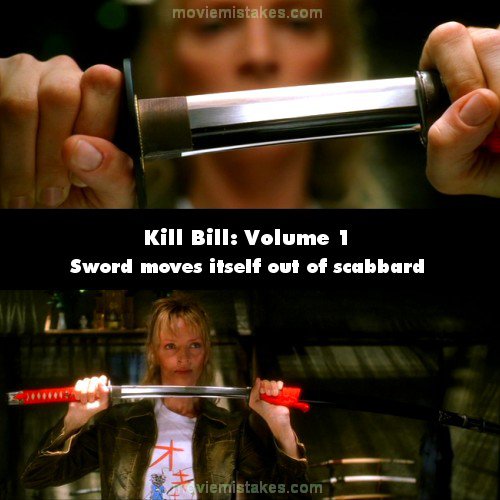
Continuity: During the "The Man from Okinawa" chapter, The Bride picks up a sword from one of the racks on the wall. She slides the sword out from its scabbard approx. 4 inches and stops. The next shot shows the reflection of her eyes in the blade. In the third shot, we see a wider view of The Bride again but now the scabbard is much farther out than where it used to be.

Previous1 2 3 4 5 6 7 8 9 10 11 12 13 14 15 16 17 18 19 20 21 22 23Next

Read all entries for Kill Bill: Volume 1

Any blue numbers are pictures visible to everyone, or all free members. The greyed out numbers are pictures that have been online for less than 6 months - those are only accessible to paid members.


You may also like: Kill Bill: Volume 2 | Pulp Fiction | The Dark Knight | Terminator 2: Judgment Day | Titanic

To submit a screenshot, just click the edit icon under the relevant entry, then choose 'add screenshot'. Thanks!

All images remain the copyright of their original owners - these low resolution images are simply individual frames used to demonstrate the entry.