Movie news
Great sites
Quotes
Sarah Connor: Keep it under 65. We don't want to be pulled over.
The Terminator: Affirmative.
John Connor: No, no, no, no. You gotta listen to the way people talk. You don't say "affirmative" or some shit like that. You say, "No problemo." If someone comes off to you with an attitude, you say "Eat me." And if you want to shine 'em on it's, "Hasta la vista, baby."
The Terminator: Hasta la vista, baby.
John Connor: Yeah. Or, "Later dickwad." If someone gets upset you say, "Chill out." Or you can do combinations.
The Terminator: "Chill out...dickwad."
John Connor: That's great! See, you're getting it.
The Terminator: No problemo.
Mistakes
When the T-1000 is chasing John in the transport truck cab, the sparks always appear before the truck actually hits the walls. See more...
Trivia
Makeup artist Jeff Dawn has said that in order to give the Terminator (Arnold Schwarznegger) a look that set him apart from the other "human" actors, the makeup artists "mixed in a little bit of K-Y Jelly into the straight make-up, to give him that 'I'm different-looking but you don't know why' look...It's a sort of plastic-man appearance." See more...
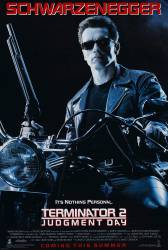
Terminator 2: Judgment Day
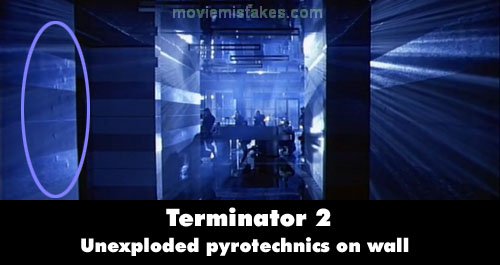
Visible crew/equipment: In the Cyberdyne lobby when the Terminator walks towards the SWAT team, you can see unexploded squibs (pyrotechnics) in the wall behind him to his left (before the shooting starts).
|
|
Previous • 1 2 3 4 5 6 7 8 9 10 11 12 13 14 15 16 17 18 19 20 21 22 23 24 25 26 27 28 29 30 31 32 33 34 35 36 37 38 39 40 41 42 43 44 45 46 47 48 49 50 51 52 53 54 55 56 57 58 59 60 61 62 63 64 65 • Next
Picture edited by John W Rosa
Read all entries for Terminator 2: Judgment Day
Any blue numbers are pictures visible to everyone, or all free members. The greyed out numbers are pictures that have been online for less than 6 months - those are only accessible to paid members.
You may also like: Terminator Salvation | The Terminator | Terminator 3: Rise of the Machines | Transformers: Revenge of the Fallen | X-Men Origins: Wolverine
To submit a screenshot, just click the edit icon under the relevant entry, then choose 'add screenshot'. Thanks!
All images remain the copyright of their original owners - these low resolution images are simply individual frames used to demonstrate the entry.