Movie news

View-Master movie?

Jaa wrestles croc

1st Brothers trailer

News Schmews Etc!

The new D9 trailer!

Quotes

The Terminator: I need a vacation

See more...

Mistakes

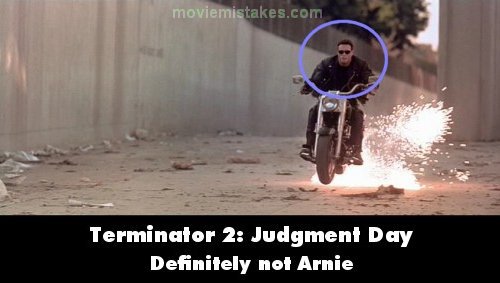
Obvious stunt double for John Connor when he takes a wide berth from the street into the aqueduct. His hair, for example, is no longer across his forehead. See more...

Trivia

The police computer which the T-1000 uses to locate John Connor's juvenile delinquent record was a functional mobile data terminal on loan from ElectroCom Automation. The prop was the subject of many crew members' inquiries of "Hey, can you look up my record for any outstanding warrants?" They were disappointed when they found out it was not hooked into any actual police databases, but had been programmed to simply display John's record. See more...

Movie Mistakes blog

Popular blog posts:

15 Transformers mistake pictures

15 biggest Harry Potter mistake pictures

10 Twilight mistakes in pictures

50 mistakes in The Simpsons

The 20 biggest Friends mistake pictures

Follow Movie Mistakes on Twitter

Bookmark

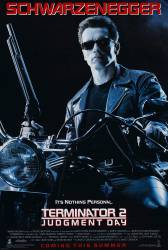
Terminator 2: Judgment Day

Revealing: When the Terminator is trying to save John from the T-1000 in the truck, he makes the jump. If you look at his face and hair while he's airborne, you can clearly see it's a stunt double. The Terminator stunt double is also obvious in other shots throughout the film.

Previous1 2 3 4 5 6 7 8 9 10 11 12 13 14 15 16 17 18 19 20 21 22 23 24 25 26 27 28 29 30 31 32 33 34 35 36 37 38 39 40 41 42 43 44 45 46 47 48 49 50 51 52 53 54 55 56 57 58 59 60 61 62 63 64 65Next

Picture submitted by 13thMonkey

Read all entries for Terminator 2: Judgment Day

Any blue numbers are pictures visible to everyone, or all free members. The greyed out numbers are pictures that have been online for less than 6 months - those are only accessible to paid members.


You may also like: Terminator Salvation | The Terminator | Terminator 3: Rise of the Machines | Transformers: Revenge of the Fallen | X-Men Origins: Wolverine

To submit a screenshot, just click the edit icon under the relevant entry, then choose 'add screenshot'. Thanks!

All images remain the copyright of their original owners - these low resolution images are simply individual frames used to demonstrate the entry.