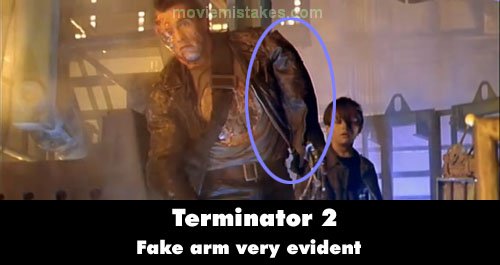
Revealing mistake: In the scene where John is helping Arnie up after the T-1000 has been exploded and sent to his doom in the fiery pit of molten steel (Arnie is saying "I need a vacation"), you can see how the effects crew haphazardly put on a fake busted mechanical arm underneath Arnie's coat and how it bulges out from his shoulder. You can almost see how they just tied Arnie's arm back behind his back and put a fake arm over him. (02:23:35)
Terminator 2: Judgment Day (1991)
84 pictures
Directed by: James Cameron
Starring: Arnold Schwarzenegger, Robert Patrick, Xander Berkeley, Edward Furlong, Linda Hamilton
To submit a picture, just click the edit icon under the relevant entry, then choose 'add a picture'. Thanks!
All images remain the copyright of their original owners - these low resolution images are simply individual frames used to demonstrate the entry.
Join the mailing list
Separate from membership, this is to get updates about mistakes in recent releases. Addresses are not passed on to any third party, and are used solely for direct communication from this site. You can unsubscribe at any time.
Check out the mistake & trivia books, on Kindle and in paperback.