Movie news
Great sites
Quotes
Cartman: Don't call me fat, you fucking Jew!
[Gasp from the class]
Mr. Garrison: Eric! Did you just say the "F" word?
Cartman: [confused] Jew?
Kyle: No, not Jew! He's talking about "fuck"! You can't say "fuck" in school, you fucking fat ass!
Mr. Garrison: Kyle!
Cartman: Why the fuck not?
Mr. Garrison: Eric!
Stan: Dude, you just said "fuck" again!
Mr. Garrison: Stanley!
Kenny: [Muffled.] Fuck.
Mr. Garrison: Kenny!
Cartman: What's the big deal? It doesn't hurt anybody. Fuck fuckety fuck fuck fuck.
Mr. Garrison: How would you like to go see the school counselor?
Cartman: How would you like to suck my balls?
[Gasp from the class.]
Mr. Garrison: What did you say?
Cartman: I'm sorry. I'm sorry. Actually, what I said was...
[Cartman pulls out a bullhorn]
Cartman: HOW WOULD YOU LIKE TO SUCK MY BALLS? MR. Garrison.
Stan: Holy shit, dude.
Mistakes
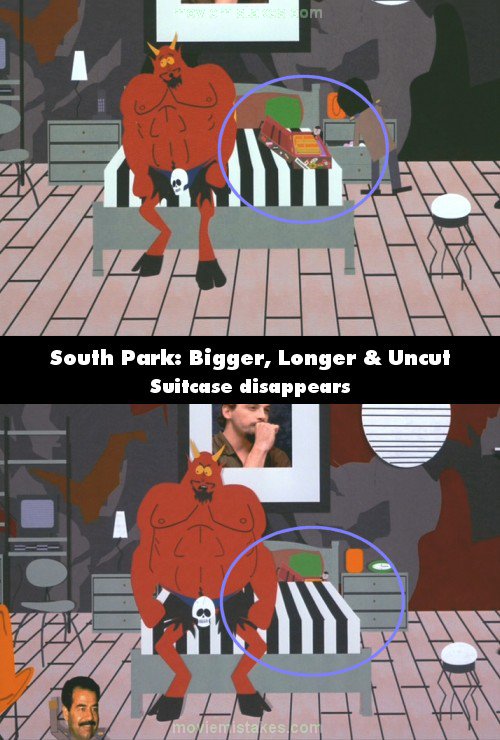
When Saddam is packing his suitcase for Earth, you can see a little doll in the case, on the right hand side of it. But in one shot when Saddam gasps because Satan says he's leaving him, the doll is on the left hand side of the case. Straight after that shot though, it's back on the right hand side of the case. See more...
Trivia
When he was accepting an MTV Movie Award, Trey Parker described the song "Uncle F****" as an anthem of freedom. See more...
South Park: Bigger, Longer & Uncut
Continuity: As Saddam starts his "I can change" song, his suitcase disappears from Satan's bed. [If you look closely at the second picture, you can see the top of the suitcase, behind the striped bedcovers. It hasn't disappeared, but has moved (which is still a mistake)]
|
|
Previous • 1 2 3 4 5 6 7 8 9 • Next
Read all entries for South Park: Bigger, Longer & Uncut
Any blue numbers are pictures visible to everyone, or all free members. The greyed out numbers are pictures that have been online for less than 6 months - those are only accessible to paid members.
You may also like: South Park | The Simpsons | The Simpsons Movie | Twilight | Titanic
To submit a screenshot, just click the edit icon under the relevant entry, then choose 'add screenshot'. Thanks!
All images remain the copyright of their original owners - these low resolution images are simply individual frames used to demonstrate the entry.