Movie news

Weekend Box-Office

Battleship spoilers?

Paltrow's a Danish

Cody Dictionary

Singing Spidey's back!

Quotes

Sweeney Todd: No! Not Barker. That man is dead. It's Todd, now. Sweeney Todd. And he shall have his revenge...

See more...

Mistakes

Just after Lovett finishes singing "Wait", Anthony comes running up the stairs and Sweeney hides behind the door holding the razor in his right hand. Anthony turns to Sweeney to speak, and Sweeney places his right hand on Anthony's back and guides him toward the window. You get a glimpse of the closed razor. The camera instantly changes to looking at Anthony's back,and Sweeney's hand is empty and fingers are spread out. When the camera angle changes again and Sweeney sits Anthony down, you get a quick glimpse of the razor in Sweeney's right hand. See more...

Trivia

During its first month of production in London, Johnny Depp had to take a ten-day leave of absence when his daughter, Lily-Rose, was rushed to a hospital due to a severe illness (which was never disclosed by the media). To accommodate his absence, director Tim Burton filmed scenes that didn't feature Depp's character. See more...

Movie Mistakes blog

Popular blog posts:

RIP Michael Jackson

15 biggest Harry Potter mistake pictures

10 Twilight mistakes in pictures

50 mistakes in The Simpsons

The 20 biggest Friends mistake pictures

Bookmark

Sweeney Todd

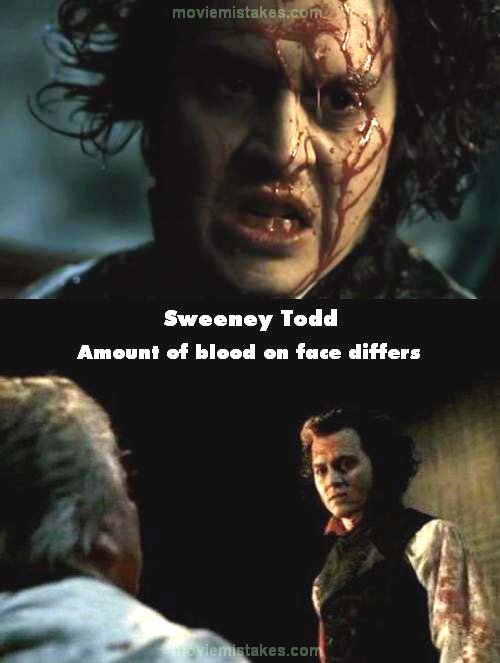
Continuity: When Sweeney kills Turpin, his forehead is covered in blood. Half a second later there's just a tiny spot.
Mistake listing Random picture (from this title) votemap vote up vote down

Previous1 2 3 4 5

Picture edited by Rikki

Read all entries for Sweeney Todd

Any blue numbers are pictures visible to everyone, or all free members. The greyed out numbers are pictures that have been online for less than 6 months - those are only accessible to paid members.


You may also like: Edward Scissorhands | Charlie and the Chocolate Factory | Corpse Bride | Twilight | Pirates of the Caribbean: The Curse of the Black Pearl

To submit a screenshot, just click the edit icon under the relevant entry, then choose 'add screenshot'. Thanks!

All images remain the copyright of their original owners - these low resolution images are simply individual frames used to demonstrate the entry.