Movie news
Great sites
Mistakes
When the water wheel begins to roll, with Norrington and Will atop and then snatches up Jack, its blades (buckets on the outside rim) and two sides of the axle face a specific direction as it gains speed. Now compare the following two shots, as the water wheel rolls away from the camera: When the wheel rolls, just as Jack falls out, after hitting his head on the bar. Then later on the beach, as Elizabeth watches, just as the wheel rolls and falls over in the close-up, the wheel is actually rolling in the opposite direction - just note its blades. Also note the bizarre change of its axle's wide and narrow sides. See more...
Trivia
The incredibly short shot of Tortuga when it is first shown (with the man being dunked and such) was actually filmed on the Pirates of the Caribbean ride in Disneyland. While the ride was shut down for remodeling, the crew actually went there and shot the scene with a mixture of live actors and existing animatronic props. If you look closely, many of the "actors" can be seen as fake. See more...
Pirates of the Caribbean: Dead Man's Chest
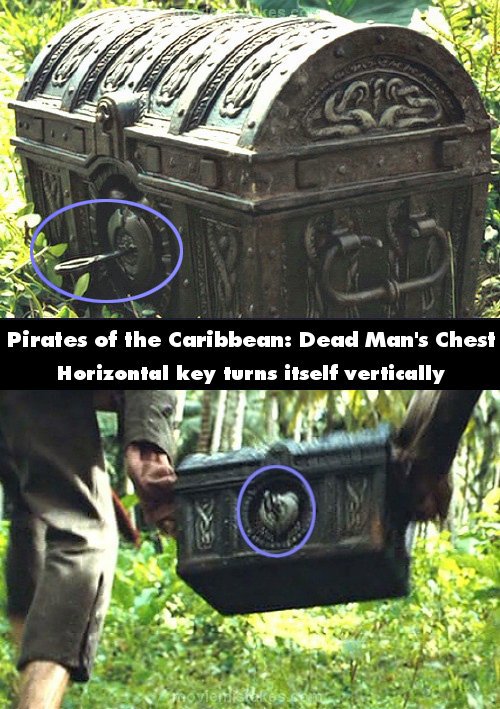
Continuity: After Jack takes the heart out of the chest he hurriedly closes its lid, the locks engage, and the key's end remains in the horizontal position when Jack runs off. However, when Pintel and Ragetti grab the chest the key's circular end is now vertical - the key does not turn itself.
Previous • 1 2 3 4 5 6 7 8 9 10 11 12 13 14 15 16 17 18 19 20 21 22 23 24 25 26 27 28 29 30 31 32 33 34 35 36 • Next
Pictured submitted and edited by Rikki
Read all entries for Pirates of the Caribbean: Dead Man's Chest
Any blue numbers are pictures visible to everyone, or all free members. The greyed out numbers are pictures that have been online for less than 6 months - those are only accessible to paid members.
You may also like: Pirates of the Caribbean: The Curse of the Black Pearl | Pirates of the Caribbean: At World's End | The Dark Knight | Twilight | Transformers: Revenge of the Fallen
To submit a screenshot, just click the edit icon under the relevant entry, then choose 'add screenshot'. Thanks!
All images remain the copyright of their original owners - these low resolution images are simply individual frames used to demonstrate the entry.