Movie news

Weekend Box-Office

JoBlo Movie Show #26

View-Master movie?

Jaa wrestles croc

1st Brothers trailer

Quotes

[Ted answers the phone.]

Bishop Brennan: Crilly, It's me.

Father Ted: Oh feck!

Bishop Brennan: What?

Father Ted: [in French accent] Who ees thees? Zere is no Creely 'ere.

[Ted hangs up.]

Father Ted: God almighty! I just said "feck" to Bishop Brennan!

Father Dougal: Oho! He won't like that!

Father Ted: It might be all right though. I disguised my voice so he'd think he dialled the wrong number.

[Phone rings, Ted picks it up.]

Father Ted: Ah, Bishop Brennan. I think you must have got the wrong number when you called there.

See more...

Mistakes

In the scene were Mrs Doyle is listing the rude words and phrases used in one of Father Ted's favorite author's book's, she goes through all of them fine. Apart from the last one, when she says "Get your boll*cks out of my face" you can hear her laughing in the word "boll*cks" before she exits the room. See more...

Trivia

Prior to playing Father Ted, Dermot Morgan was also "Father Trendy", a clerical send-up he regularly performed on The Late Late Show, another Irish TV production. See more...

Movie Mistakes blog

Popular blog posts:

15 Transformers mistake pictures

15 biggest Harry Potter mistake pictures

10 Twilight mistakes in pictures

50 mistakes in The Simpsons

The 20 biggest Friends mistake pictures

Follow Movie Mistakes on Twitter

Bookmark

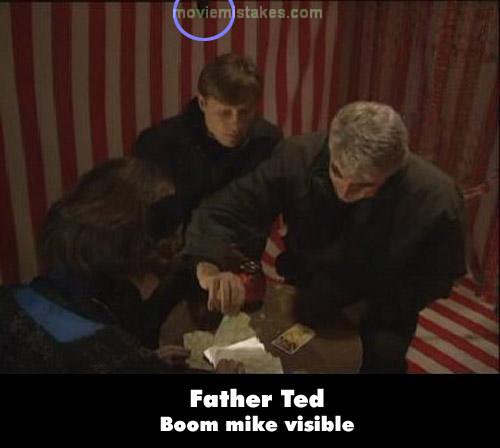
Father Ted - Good Luck, Father Ted (S1 E1)

Visible crew/equipment: In the fortune-teller's tent, just as Ted chooses his second card, the boom mic enters the frame above Dougal's head.
Previous1 2 3Next

Picture edited by Mortug

Read all entries for Father Ted

Any blue numbers are pictures visible to everyone, or all free members. The greyed out numbers are pictures that have been online for less than 6 months - those are only accessible to paid members.


You may also like: Titanic | The Lost World: Jurassic Park | Terminator 2: Judgment Day | Ice Age | Indiana Jones and The Last Crusade

To submit a screenshot, just click the edit icon under the relevant entry, then choose 'add screenshot'. Thanks!

All images remain the copyright of their original owners - these low resolution images are simply individual frames used to demonstrate the entry.