Movie news

View-Master movie?

Jaa wrestles croc

1st Brothers trailer

News Schmews Etc!

The new D9 trailer!

Quotes

Dr. Cox: Let me ask you a quick question: are you trying to make my head explode? Because you have no idea just how frustrating it is working your ass off trying to inflate a tiny little balloon inside somebody's clogged artery when all that person has to do, really is - oh, I don't know - go for a walk in the morning or choke down a fresh green salad. And you come back here looking like that? And, I know here, I know I'm supposed to be Dr. Give-A-Crap, but you wanna hear the God's honest truth? And this is a fact: you are what you eat. And you clearly went out and devoured a big fat guy, didn't ya?

See more...

Mistakes

When Elliot is talking to the patient you can see the boom mic thru the reflection of the window next to patient's forehead. See more...

Trivia

When we see the inside of Ted's office there is a keyboard but no monitor or computer. Probably to show Ted has no importance in the hospital. See more...

Movie Mistakes blog

Popular blog posts:

15 Transformers mistake pictures

15 biggest Harry Potter mistake pictures

10 Twilight mistakes in pictures

50 mistakes in The Simpsons

The 20 biggest Friends mistake pictures

Follow Movie Mistakes on Twitter

Bookmark

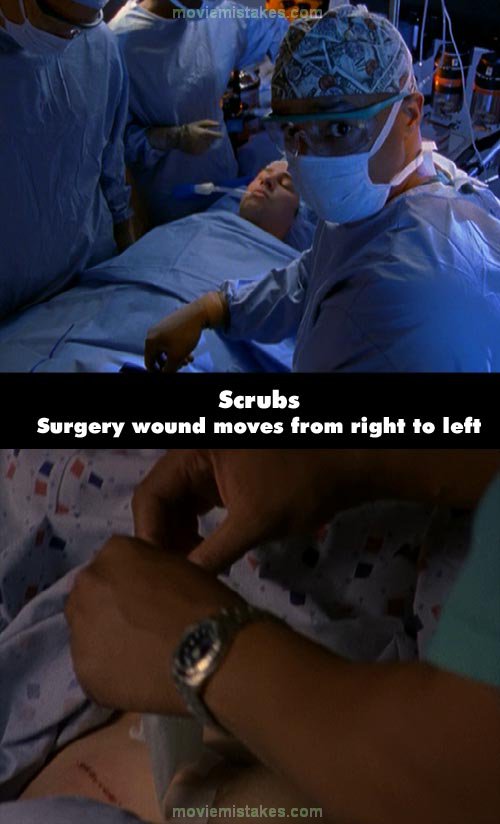
Scrubs - My Day Off (S1 E9)

Continuity: When Turk operates on JD he cuts open the left side of his abdomen. However, when JD is in recovery the bandage is on the right side of his abdomen.
Previous1 2 3 4 5 6 7 8 9 10 11 12 13 14 15 16 17 18 19 20 21 22 23 24 25 26 27 28 29 30 31 32 33 34 35 36 37 38 39 40 41 42 43 44 45 46 47 48 49 50 51 52 53 54 55 56 57 58 59 60 61 62 63 64 65 66 67Next

Picture submitted by pinkwafer

Read all entries for Scrubs

Any blue numbers are pictures visible to everyone, or all free members. The greyed out numbers are pictures that have been online for less than 6 months - those are only accessible to paid members.


You may also like: Friends | Family Guy | Twilight | The Simpsons | The Dark Knight

To submit a screenshot, just click the edit icon under the relevant entry, then choose 'add screenshot'. Thanks!

All images remain the copyright of their original owners - these low resolution images are simply individual frames used to demonstrate the entry.