Movie news

JoBlo Movie Show #26

View-Master movie?

Jaa wrestles croc

1st Brothers trailer

News Schmews Etc!

Quotes

Jack: I'm the king of the world!

See more...

Mistakes

This mistake, as far as I know, can only be seen in widescreen. After Rose, Jack, Tommy & Fabrizio have run on deck (after breaking the gate down), the camera looks down the ship toward the bow. If you look at this in slow-mo, you can see city lights in the top-left hand corner of the picture. I know these are city lights because in a book about the movie, it shows a similar picture. See more...

Trivia

At the end when Rose is lying on the wooden door she is looking at the sky singing "come Josephine..." When you look hard you see that the stars in the sky are symmetrical. You can actually draw a line in it. [That is not exactly the case.  If you look VERY carefully (this is much more effective on a big screen), you can see that the stars form the outline of the famous necklace, The Heart of the Ocean.  I guess Cameron was a little bored that day.] See more...

Movie Mistakes blog

Popular blog posts:

15 Transformers mistake pictures

15 biggest Harry Potter mistake pictures

10 Twilight mistakes in pictures

50 mistakes in The Simpsons

The 20 biggest Friends mistake pictures

Follow Movie Mistakes on Twitter

Bookmark

Titanic

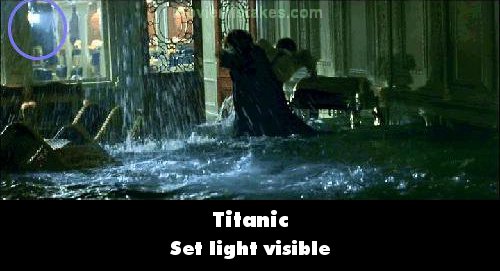
Visible crew/equipment: When Jack and Rose are running away from Cal to the first class dining room, if you look at the glass you can see a black screen, a light, and a crewman.

Previous1 2 3 4 5 6 7 8 9 10 11 12 13 14 15 16 17 18 19 20 21 22 23 24 25 26 27 28 29 30 31 32 33 34 35 36Next

Picture edited by AidanN

Read all entries for Titanic

Any blue numbers are pictures visible to everyone, or all free members. The greyed out numbers are pictures that have been online for less than 6 months - those are only accessible to paid members.


You may also like: Twilight | Friends | The Dark Knight | Pirates of the Caribbean: The Curse of the Black Pearl | Transformers: Revenge of the Fallen

To submit a screenshot, just click the edit icon under the relevant entry, then choose 'add screenshot'. Thanks!

All images remain the copyright of their original owners - these low resolution images are simply individual frames used to demonstrate the entry.