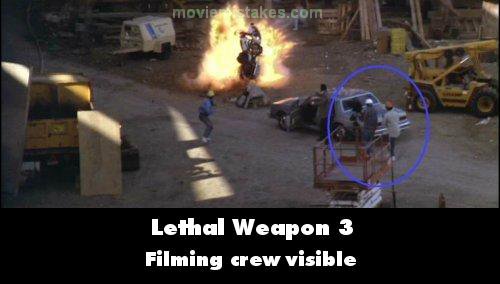
Visible crew/equipment: As the motorbike falls from the highway, just after it explodes there's a very short wide shot of the site with Danny Glover standing by his car and a couple of guys in hard hats standing around (or running for their life). If you look right behind Danny Glover you can see two people, one in a white hat, one in a red, and one of them is holding a camera - they start moving backwards just before the end of the shot. We then see the bike blowing up, then a close up shot of Danny Glover, from the camera we've just seen. (01:30:25)
Lethal Weapon 3 (1992)
2 pictures
Directed by: Richard Donner
Starring: Mel Gibson, Danny Glover, Rene Russo, Joe Pesci
To submit a picture, just click the edit icon under the relevant entry, then choose 'add a picture'. Thanks!
All images remain the copyright of their original owners - these low resolution images are simply individual frames used to demonstrate the entry.
Join the mailing list
Separate from membership, this is to get updates about mistakes in recent releases. Addresses are not passed on to any third party, and are used solely for direct communication from this site. You can unsubscribe at any time.
Check out the mistake & trivia books, on Kindle and in paperback.