Movie news

Viggo talks Hobbit

Fincher gets Proud

Jones' Code gets Jake

Weekend Box-Office

Battleship spoilers?

Quotes

Obi-Wan Kenobi: You were right about one thing master, the negotiations were short.

See more...

Mistakes

When Darth Maul is killed and begins to fall, he is holding his lightsabre, but when we see him falling down the pit, no lightsabre is falling through the air. See more...

Trivia

If you watch closely during the scene in the senate, right after Queen Amidala calls for a vote of no confidence in the chancellor, the camera starts showing different views. The shot after a Senator asks for order is a group of pods with aliens in them. If you look in the lower left, you can see a pod full of E.T's. There's also a pod full of Wookies seen at one point (with their traditional noises, and for the first time in 20 years, the species was played by someone other than Peter Mayhew). See more...

Movie Mistakes blog

Popular blog posts:

RIP Michael Jackson

15 biggest Harry Potter mistake pictures

10 Twilight mistakes in pictures

50 mistakes in The Simpsons

The 20 biggest Friends mistake pictures

Bookmark

Star Wars: Episode I - The Phantom Menace

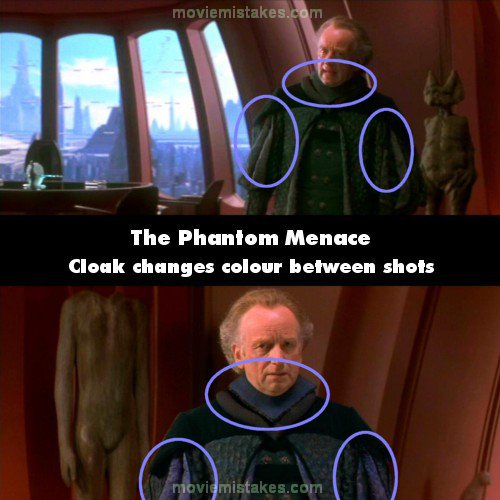
Continuity: When Palpatine and Queen Amidala are conversing in his office (when Palpatine refers to Valorum having 'very little real power') his outfit switches from a green breasted cloak with a blue collar area to a green breasted cloak and dark green collar. It switches back after one shot.

Mistake listing Random picture (from this title) votemap vote up vote down

Previous1 2 3 4 5 6Next

Picture submitted by Lummie

Read all entries for Star Wars: Episode I - The Phantom Menace

Any blue numbers are pictures visible to everyone, or all free members. The greyed out numbers are pictures that have been online for less than 6 months - those are only accessible to paid members.


You may also like: Star Wars: Episode III - Revenge of the Sith | Transformers: Revenge of the Fallen | Star Wars: Episode II - Attack of the Clones | Star Wars | Sky High

To submit a screenshot, just click the edit icon under the relevant entry, then choose 'add screenshot'. Thanks!

All images remain the copyright of their original owners - these low resolution images are simply individual frames used to demonstrate the entry.