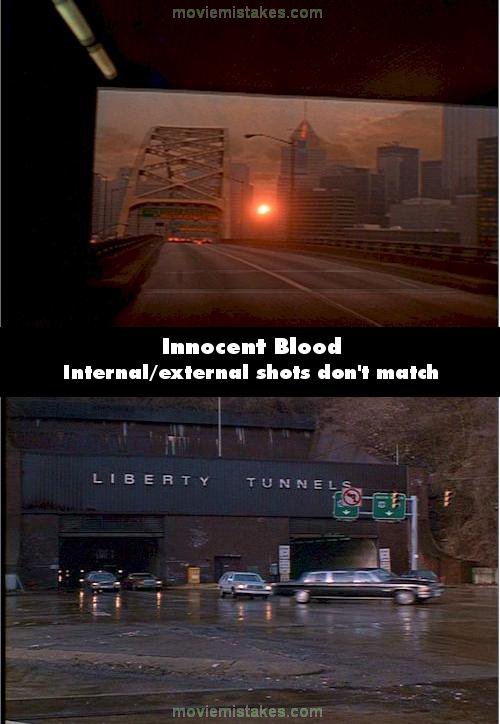
Revealing mistake: In the chase scene about an hour into the movie, Robert Loggia is shown entering the Liberty Tunnel, driving on a wet road. Note the vaulted round ceiling of the tunnel. Next, we see a series of shots of him in the tunnel, and then a shot of the sun rising over Pittsburgh as he is about to leave the tunnel. Here is the problem - the sunrise shot is taken from the Fort Pitt tunnel on a different day. Note the dry road, the barriers to the driver's left at the tunnel exit and the Fort Pitt bridge straight ahead. There is no place for the driver to make a left turn out of this tunnel. Also note that the POV is from the left lane. All the Liberty Tunnel shots show Loggia in the right lane. The next shot shows Loggia exiting the Liberty Tunnel and making a left turn from the right lane, causing a pile-up. (01:11:10 - 01:12:20)
Innocent Blood (1992)
2 pictures
Directed by: John Landis
Starring: Robert Loggia, Chazz Palminteri, Anthony LaPaglia, David Proval, Anne Parillaud, Rocco Sisto
To submit a picture, just click the edit icon under the relevant entry, then choose 'add a picture'. Thanks!
All images remain the copyright of their original owners - these low resolution images are simply individual frames used to demonstrate the entry.
Join the mailing list
Separate from membership, this is to get updates about mistakes in recent releases. Addresses are not passed on to any third party, and are used solely for direct communication from this site. You can unsubscribe at any time.
Check out the mistake & trivia books, on Kindle and in paperback.