Movie news

JoBlo Movie Show #26

View-Master movie?

Jaa wrestles croc

1st Brothers trailer

News Schmews Etc!

Mistakes

During Harry's party, when George is outside talking to his mother she encourages him to see Mary and George says "Point me in the right direction." He then exits right and immediately returns. As he passes by, there is a glitch in the film and for a brief moment everything speeds up. This is most evident if you watch the people dancing in the house because they appear as though they clicked into "fast-forward motion" briefly and then return to normal. See more...

Trivia

The scene in the bar where Jimmy Stewart is crying and saying "please God" was originally not shot as a close up. Capra shot the scene, then asked Stewart to act the scene again for the close up shots. Stewart didn't think he could reproduce the emotion, so Capra actually blew the scene up frame-by-frame. See more...

Movie Mistakes blog

Popular blog posts:

15 Transformers mistake pictures

15 biggest Harry Potter mistake pictures

10 Twilight mistakes in pictures

50 mistakes in The Simpsons

The 20 biggest Friends mistake pictures

Follow Movie Mistakes on Twitter

Bookmark

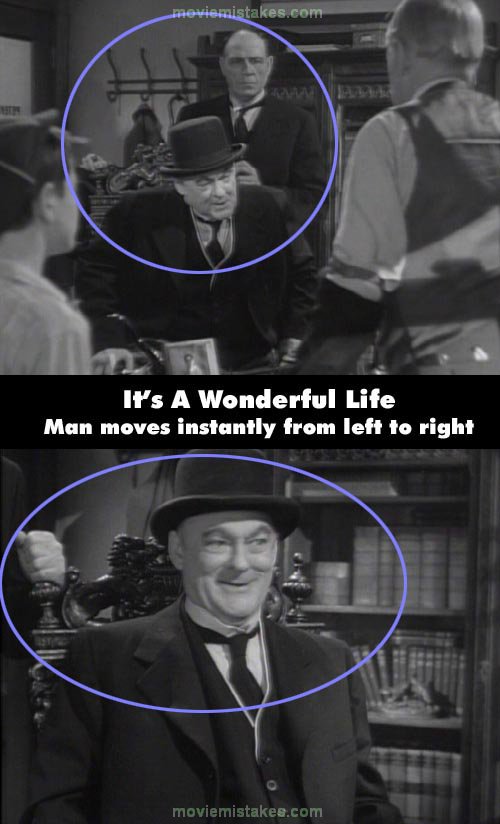
It's a Wonderful Life

Continuity: During a confrontation between old man Potter and Peter Bailey at the Building and Loan, Potter's bodyguard stands behind the wheelchair on its left side. But in the close-up shot of Potter, the arms and hands of his bodyguard can be seen extending from the right side of the wheelchair. In the next full screen shot, the bodyguard is seen on the left side of the wheelchair once again.
Previous1 2 3 4 5 6 7 8 9 10Next

Picture submitted by pinkwafer

Read all entries for It's a Wonderful Life

Any blue numbers are pictures visible to everyone, or all free members. The greyed out numbers are pictures that have been online for less than 6 months - those are only accessible to paid members.


You may also like: The Godfather | Little Miss Sunshine | Scream | ER | Bowling for Columbine

To submit a screenshot, just click the edit icon under the relevant entry, then choose 'add screenshot'. Thanks!

All images remain the copyright of their original owners - these low resolution images are simply individual frames used to demonstrate the entry.