Movie news
Great sites
Mistakes
When Pacey and Joey are in the break room, waiting for the police to call them back, they start arguing. The phone suddenly rings, and Joey asks Pacey not to answer it in order to finish their conversation. But this doesn't make logical sense; considering their desperate circumstances (being locked in the store all night) and how hard they tried to get hold of law enforcement to help them get out, there is no way Joey would not want to answer such a critical phone call. It may have been their only chance to communicate with help. See more...
Trivia
In this scene; when Pacey, Dawson and Joey are in the car driving back from the hospital, they aren't actually driving. This scene was filmed using something called a "Poor Man's Process"; which involved shaking the car a little, and a crew person holding two lights behind them to simulate headlights. This scene was actually shot on a soundstage, and could be fit in easily at virtually any point in the filming schedule. Normally scenes like this are shot with a car being towed on a trailer, but in this case that method was too expensive for their TV budget. See more...
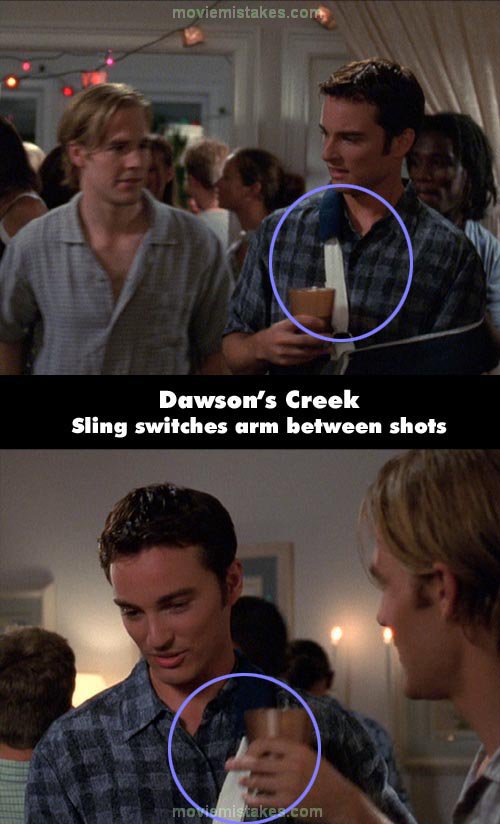
Dawson's Creek - Future Tense (S4 E4)
Continuity: During this episode, Jack injures his left shoulder playing football and has to wear a sling the entire time. Every single time Jack is shown, he is wearing a blue sling on his left arm, with the supporting strap across his right shoulder (to provide diagonal support), except once. During the party scene when Jack is talking to Dawson - the blue sling is suddenly over his right arm, with the supporting strap across his left shoulder.
|
|
Previous • 1 2 3 4 5 6 7 8 9 10 • Next
Picture submitted by pinkwafer
Read all entries for Dawson's Creek
Any blue numbers are pictures visible to everyone, or all free members. The greyed out numbers are pictures that have been online for less than 6 months - those are only accessible to paid members.
You may also like: Friends | ER | Batman Begins | The Shining | The Godfather
To submit a screenshot, just click the edit icon under the relevant entry, then choose 'add screenshot'. Thanks!
All images remain the copyright of their original owners - these low resolution images are simply individual frames used to demonstrate the entry.


