Movie news

Weekend Box-Office

Battleship spoilers?

Paltrow's a Danish

Cody Dictionary

Singing Spidey's back!

Quotes

Peter Parker: Mr. Jameson, please, aren't there any of these shots you can use? I really need the money.

J. Jonah Jameson: Awww. Miss Brant?

Miss Brant: Yeah?

J. Jonah Jameson: Get me a violin.

See more...

Mistakes

Just after the bank robbery, Spider-Man and Doc Ock are on the side of the building. Doc Ock says "oops, butterfingers." Spider-Man shoots a web to catch Aunt May. In this shot, Spider-Man is on one knee with the other one resting on the wall, yet in the following shot he is standing up and leaning back to pull Aunt May up. See more...

Trivia

When Spider-Man sets the pizzas on the balcony, we see a man try to steal a piece. This man is Scott Spiegel. Spiegel has appeared in almost all of Sam Raimi's films, including The Evil Dead, Darkman, and the first Spider-Man. See more...

Movie Mistakes blog

Popular blog posts:

RIP Michael Jackson

15 biggest Harry Potter mistake pictures

10 Twilight mistakes in pictures

50 mistakes in The Simpsons

The 20 biggest Friends mistake pictures

Bookmark

Spider-Man 2

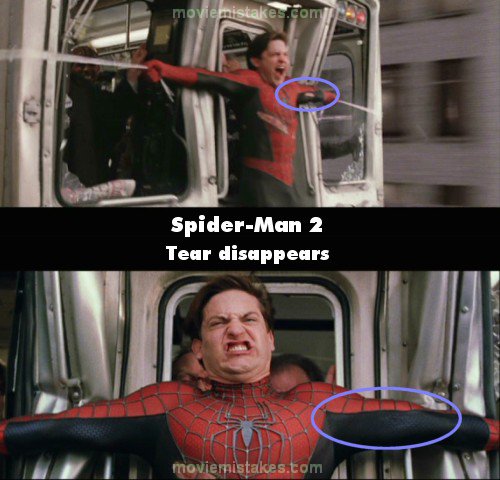
Continuity: As Peter stops the elevated train with many webs, a tear appears in his suit on the inside left arm during a closeup. Later, when his arms are still outstreched, there are many shots where you can see that the tear has disappeared; for example, a few shots later when he is still trying to stop the train; when the passengers are lifting him over their heads into the train; and many others.
Mistake listing Random picture (from this title) votemap vote up vote down

Previous1 2 3 4 5 6 7 8 9 10

Read all entries for Spider-Man 2

Any blue numbers are pictures visible to everyone, or all free members. The greyed out numbers are pictures that have been online for less than 6 months - those are only accessible to paid members.


You may also like: Spider-Man | You, Me and Dupree | Baby Mama | American Gangster | Nutty Professor II: The Klumps

To submit a screenshot, just click the edit icon under the relevant entry, then choose 'add screenshot'. Thanks!

All images remain the copyright of their original owners - these low resolution images are simply individual frames used to demonstrate the entry.