Movie news

Weekend Box-Office

Battleship spoilers?

Paltrow's a Danish

Cody Dictionary

Singing Spidey's back!

Mistakes

The opening shot of the movie shows the 'Bay City' police department front entrance, and there is a 2-door silver Torino parked up front. If you look closely, you will see that it is actually Starsky's red and white Torino, but the film has been modified to 'hide' the car from being obvious. Even though the car was shown speeding around in the opening 'credits', it had not made its 'debut' at this point in the movie, so the producers were probably saving its 'first' appearance for the spectacular first stunt scene. The opening shot of the front of the police station shows up later in the movie, yet this time the red and white Torino is 'magically' in place of the silver one. It is obviously the same piece of film, due to the same cars driving by and the same people populating the scene. See more...

Trivia

Will Ferrell goes uncredited for his role as the dragon-loving inmate. See more...

Movie Mistakes blog

Popular blog posts:

RIP Michael Jackson

15 biggest Harry Potter mistake pictures

10 Twilight mistakes in pictures

50 mistakes in The Simpsons

The 20 biggest Friends mistake pictures

Bookmark

Starsky & Hutch

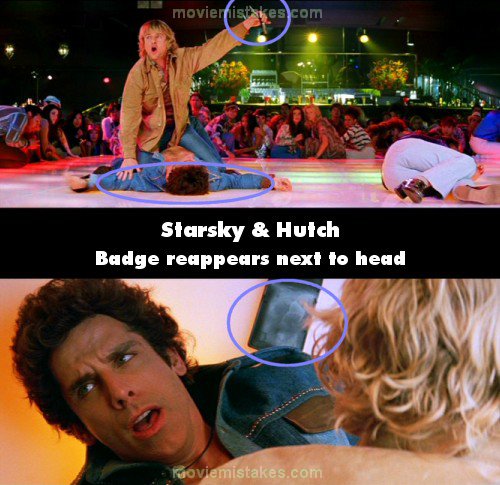
Continuity: When Hutch tackles Starsky to the ground after his gun goes off in the disco, Starsky's badge falls to the ground beside his head. Hutch grabs it and holds it up, telling people to calm down, but when the shot returns to Starsky the badge is still there next to his head.

Mistake listing Random picture (from this title) votemap vote up vote down

Previous1 2 3 4 5Next

Read all entries for Starsky & Hutch

Any blue numbers are pictures visible to everyone, or all free members. The greyed out numbers are pictures that have been online for less than 6 months - those are only accessible to paid members.


You may also like: Shooter (2007) | The X-Files | Superman | Pirates of the Caribbean: The Curse of the Black Pearl | Two Weeks Notice

To submit a screenshot, just click the edit icon under the relevant entry, then choose 'add screenshot'. Thanks!

All images remain the copyright of their original owners - these low resolution images are simply individual frames used to demonstrate the entry.