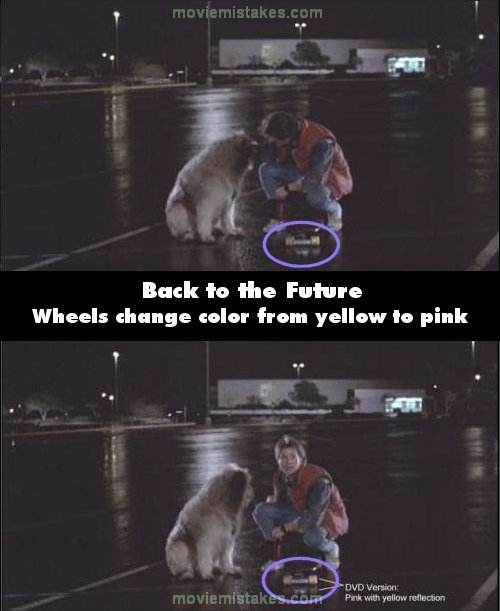
Continuity mistake: Beginning of film. When Marty arrives at Twin Pines as the Doc requested he cruises up alongside Einstein on his skateboard, saying "Where's the doc, boy?" There's a cut to the truck opening, then back to Marty, and for some strange reason the yellow wheels on his skateboard have turned pink, but the reflection on the wet car park is still yellow. It cuts back to the DeLorean coming out of the truck then back to Marty, and his wheels are yellow again. This doesn't happen in the VHS version. (00:17:40)
Back to the Future (1985)
102 pictures
Directed by: Robert Zemeckis
Starring: Christopher Lloyd, Michael J. Fox, Lea Thompson, Crispin Glover, Thomas F. Wilson
To submit a picture, just click the edit icon under the relevant entry, then choose 'add a picture'. Thanks!
All images remain the copyright of their original owners - these low resolution images are simply individual frames used to demonstrate the entry.
Join the mailing list
Separate from membership, this is to get updates about mistakes in recent releases. Addresses are not passed on to any third party, and are used solely for direct communication from this site. You can unsubscribe at any time.
Check out the mistake & trivia books, on Kindle and in paperback.