Movie news

Weekend Box-Office

Battleship spoilers?

Paltrow's a Danish

Cody Dictionary

Singing Spidey's back!

Quotes

Pippin: They think we have the Ring!

Merry: Shhhh! As soon as they find out we don't we're dead!

See more...

Mistakes

In the scene after the Helm's Deep battle, when Aragorn meets Eowyn, the earlier footage of Aragorn's return to Helm's Deep is used. He has the wound on his shoulder and is dressed like he was during the 'falling' episode. The background (people in the fortress walking calmly) also indicates that this takes place before the battle. This scene should immediately follow the one where Aragorn is greeted by Gimli ("you are the most reckless man I ever knew"). Confirmed on cast commentary, extended DVD. See more...

Trivia

The filming of the Battle of Helm's Deep was so long and grueling (months), that by the end of the shoot, the actors, crew and extras had T-shirts made up that read, "I survived Helm's Deep," but with the letter "m" crossed out. See more...

Movie Mistakes blog

Popular blog posts:

RIP Michael Jackson

15 biggest Harry Potter mistake pictures

10 Twilight mistakes in pictures

50 mistakes in The Simpsons

The 20 biggest Friends mistake pictures

Bookmark

The Lord of the Rings: The Two Towers

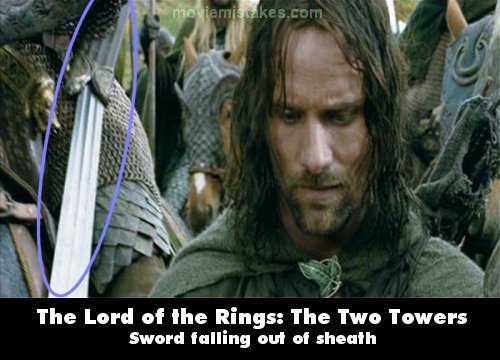
Other: When Eomer is mounting his horse after giving Aragorn, Legolas and Gimli the two horses, you can see his sword falling out of its sheath.

Mistake listing Random picture (from this title) votemap vote up vote down

Previous1 2 3 4 5 6 7 8 9 10 11 12 13 14 15 16 17 18 19 20 21 22 23 24 25 26 27 28 29Next

Read all entries for The Lord of the Rings: The Two Towers

Any blue numbers are pictures visible to everyone, or all free members. The greyed out numbers are pictures that have been online for less than 6 months - those are only accessible to paid members.


You may also like: The Lord of the Rings: The Fellowship of the Ring | The Lord of the Rings: The Return of the King | Pirates of the Caribbean: The Curse of the Black Pearl | Star Wars | Titanic

To submit a screenshot, just click the edit icon under the relevant entry, then choose 'add screenshot'. Thanks!

All images remain the copyright of their original owners - these low resolution images are simply individual frames used to demonstrate the entry.