Movie news

Weekend Box-Office

Battleship spoilers?

Paltrow's a Danish

Cody Dictionary

Singing Spidey's back!

Quotes

Kyle Reese: Listen! And understand. That Terminator is out there! It can't be bargained with, can't be reasoned with! It doesn't feel pity or remorse or fear, and it absolutely will not stop. EVER! Until you are dead!

See more...

Mistakes

As the Terminator moves his right arm whilst in the press, you can see a crew member, behind the Terminator, move in the area of the picture where its arm was. See more...

Trivia

The "smoke" effect coming off Terminator's jacket during the scene where he is riding on the hood of Reese and Sarah's car in the alleyway outside Tech Noir was created by pouring a mild acid onto the jacket. Arnold begged for an alternative method, as the idea understandably made him rather nervous, but eventually he agreed to it. See more...

Movie Mistakes blog

Popular blog posts:

RIP Michael Jackson

15 biggest Harry Potter mistake pictures

10 Twilight mistakes in pictures

50 mistakes in The Simpsons

The 20 biggest Friends mistake pictures

Bookmark

The Terminator

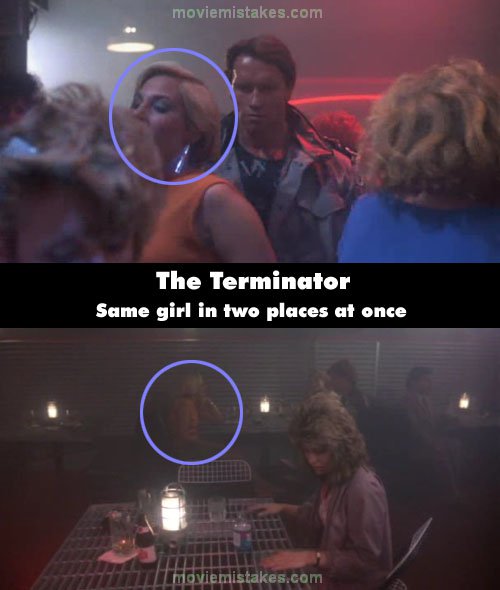
Continuity: In the Tech Noir Bar, the same woman - blonde with a pink or orange dress - must have come dancing with her twin, because while she's sitting behind Sarah Connor when the laser beam is pointed at her, she's also dancing near Arnie. The T-800 moves past her when he sees Sarah Connor and moves to shoot her.

Mistake listing Random picture (from this title) votemap vote up vote down

Previous1 2 3 4 5 6 7 8 9 10 11 12 13 14 15 16 17 18 19 20 21 22 23 24 25 26 27 28 29 30 31 32 33 34 35 36 37 38 39 40 41Next

Read all entries for The Terminator

Any blue numbers are pictures visible to everyone, or all free members. The greyed out numbers are pictures that have been online for less than 6 months - those are only accessible to paid members.


You may also like: Terminator 2: Judgment Day | Terminator 3: Rise of the Machines | Titanic | Terminator Salvation | Back to the Future

To submit a screenshot, just click the edit icon under the relevant entry, then choose 'add screenshot'. Thanks!

All images remain the copyright of their original owners - these low resolution images are simply individual frames used to demonstrate the entry.