Movie news

Shatner's Trek lines

Robsessed coming

1999: A Look Back, Pt. 2

Bioshock photoshoot

Sandler golf suit?

Quotes

Obi-Wan Kenobi: I was beginning to wonder if you'd got my message.

Anakin Skywalker: I retransmitted it to Coruscant, just as you requested, Master. Then we decided to come and rescue you.

[Obi-Wan glances up at his cuffed hands]

Obi-Wan Kenobi: Good job.

See more...

Mistakes

During the scene at the dinner table with Anakin and Padme, Anakin makes a piece of fruit fly around. He then has it land on a plate and cuts it with a fork and knife. It happens fast but you don't really even need slow motion or pause to see that the fruit doesn't react to Anakin sticking his fork or knife in it at all. The knife and fork just vanish into the fruit. See more...

Trivia

The vehicle that Anakin steals for the Coruscant chase scene has deer whistles on it, right behind Anakin and Obi-Wan's heads. For those that don't know what deer whistles are, they are small whistles that mount on the bumper of your car and make a high-pitched noise (too high for human ears but perfect for animals) to scare deer off the highways. See more...

Movie Mistakes blog

Popular blog posts:

RIP Michael Jackson

10 Twilight mistakes in pictures

50 mistakes in The Simpsons

15 biggest Harry Potter mistake pictures

The 20 biggest Friends mistake pictures

Bookmark

Star Wars: Episode II - Attack of the Clones

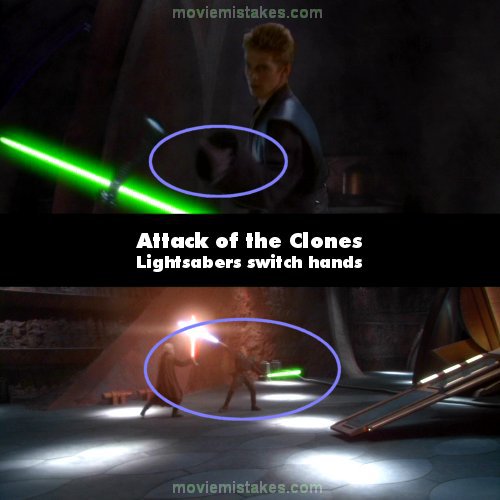
Continuity: When Anakin is fighting Count Dooku, he takes Ben's blue light sabre in his left hand, in the next shot he is holding it in his right hand.

Mistake listing Random picture (from this title) votemap vote up vote down

Previous1 2 3 4 5 6 7 8 9 10 11 12 13 14 15 16 17 18 19 20 21 22 23 24 25Next

Read all entries for Star Wars: Episode II - Attack of the Clones


You may also like: Star Wars: Episode III - Revenge of the Sith | Star Wars: Episode I - The Phantom Menace | Star Wars | Star Wars: Episode VI - Return of the Jedi | Star Wars: Episode V - The Empire Strikes Back

To submit a screenshot, just click the edit icon under the relevant entry, then choose 'add screenshot'. Thanks!

All images remain the copyright of their original owners - these low resolution images are simply individual frames used to demonstrate the entry.