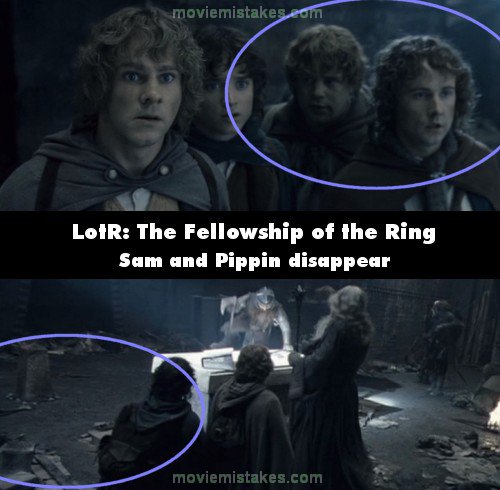
Continuity mistake: In Balin's tomb, just before the Orcs break in and the fight begins, watch the Hobbits behind Gandalf. In the front view, they are huddled together in close proximity. When the shot changes to the rear view, you can only see two Hobbits (Pippin and Sam) behind Gandalf because they are much more spaced out. When the camera comes back to the front view, they are close together again. (00:27:24)
The Lord of the Rings: The Fellowship of the Ring (2001)
59 pictures
Directed by: Peter Jackson
Starring: Christopher Lee, Sean Bean, Cate Blanchett, Elijah Wood, Ian McKellen, Viggo Mortensen, Ian Holm, Liv Tyler, Sean Astin, Hugo Weaving, John Rhys-Davies, Orlando Bloom, Dominic Monaghan, Billy Boyd
To submit a picture, just click the edit icon under the relevant entry, then choose 'add a picture'. Thanks!
All images remain the copyright of their original owners - these low resolution images are simply individual frames used to demonstrate the entry.
Join the mailing list
Separate from membership, this is to get updates about mistakes in recent releases. Addresses are not passed on to any third party, and are used solely for direct communication from this site. You can unsubscribe at any time.
Check out the mistake & trivia books, on Kindle and in paperback.